Section Group Context Menu
February 19, 2023
Last updated on August 15, 2026
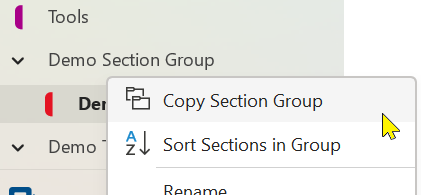
Right-click a section group to display its context menu. OneMore commands appear at the top of this menu as shown here.
Add to Favorites
See also Favorites Commands
Adds the current section group to the Favorites collection.
Archive Folder
See also File Commands
Creates a zip file of all pages in the section group, including all images and file attachments on each page. Also fixes the hyperlinks between pages within the context of the archive so the archive can stand on its own as a working directory of HTML files with live hyperlinks.
Copy Section Group
Copies a section group (folder) to another notebook or section group. Note that sections on each level of the hierarchy must have unique names. If there are two sibling sections with the same name then pages may be copied only to the first section.
Open in File Explorer
For sections and section groups in a notebook that is stored locally on the current machine (not on OneDrive), this will open the location of that object in File Explorer.
Sort Sections in Group
Sorts only the sections in the current section group, without affecting the parent or child groups.
#omwiki #ommenus
© 2020 Steven M Cohn. All rights reserved.
Please consider a sponsorship or one-time donation to support ongoing development
Created with OneNote.